Back to community
Under discussion

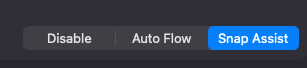
Assign keyboard shortcuts to. 'Auto Flow' x 'Snap Assist' x 'Disabled'

Mr.Tweaks#0369OP

It comes down to what you mentioned yourself somewhere, mentioning 'Auto Flow' being peceived as intimidating.
I dont think it's inimidating useful even, but also annoying - like ALL auto arrange functionality out there.

So; please make Autoarrangement a 'one shot' option, instead of a static setting.
With 'Equalize Windows' your providing a part. My suggestion is another part of the rest to complete the workflow that gives automation, which doenst get anoying, because you can 'switch/deactivate' by the push of a button.

image.png

Replies7

WrapperDeveloper
· Edited Mar 10, 2026, 10:13 AM UTC

I think I will add a mode switch option to the menu bar. If you don't like having your windows automatically arranged, you can choose "Snap Assist" mode.

The reason you want to temporarily switch to "Auto Flow" is because you want to use the automatic layout function temporarily?

Mr.Tweaks#0369OP

Yes, exactly - It 's a quick (random) arrangement to tidy it up/set a structure. After, I want to be 'free' or perhaps just have snap assist active.

Ideal!

There is no learning curve/gradual adoption mode for BSP. Effectively halting/hindering productivity until you get used to it. So be it, and it could work wonderfully, but personally I find it a bit too rigid. Ideally one would be able to 'throttle/dose' the BSP-enforcing, which would provide the flexibility and means to adopt/adapt organically, easing into it.

WrapperDeveloper

I think a better way is that I will add a new feature to snap mode: auto arrange windows

Mr.Tweaks#0369OP

Sounds great!
Looking forward to it.

PS: I don't see any mention in the release notes/version history, but I'm inclined to say some things w/ regards Auto Flow/BSP improved.

WrapperDeveloper

WM mode options in the status menu have been included in v0.13.3. The auto-arrange feature will come later.

WrapperDeveloper

Snap mode auto-arrange have been updated in v0.13.4. I tried it and think this feature is great, thanks for the inspiration!

Mr.Tweaks#0369OP

Lovely! Happy to help! Thank you for the openminded apporacht and the quick delivery! It’s obviousy great to hear that you like it too.
What I really like is how it just fits. It gives the other shortcuts—especially “toggle floating tiling”—more prominence and purpose from a workflow perspective.

There is only one last thing that I think would make it perfect.

What I initially requested was a way to activate or switch between Auto Flow and Snap Assist. I think the auto‑arrange function already goes a long way toward bringing the original intention behind this request to life, which was the dynamic rearranging.

However, I would still like to be able to switch between them—not so much for the auto‑rearranging anymore, but for the mode switch itself.

In the current way of working, I rely a lot on shortcuts. Having to go to the menu every now and then breaks the flow and takes a relatively long time.

NB: I also tried accessing the menu to create shortcuts, but unfortunately these options are not exposed there (and i don't wat to do it via UI scripting).

Ideally, the three options could be presented as two switches/menu options—or assignable toggles:

  1. Mode status (disabled / enabled)
  2. Mode setting (Auto Flow / Snap Assist)

That would make it perfect 😍

Open in Discord