Back to community
Feature request

Shortcuts for resize left/right/up/down

hhipOP

I'm currently migrating from yabai and I find myself missing the ability to resize tiled windows by "moving the split" left/right/up/down (four shortcuts—I've been using vim-style hyper-h/j/k/l for that).

Say you have two windows left and right, then "resize left" would make the left window smaller, regardless of which one is actually active.

And if you have tree windows in big left/2-stack right layout, then resizing up/down would move the right stack vertical split up and down accordingly. Again, regardless of which window is active in the space.

Is there something like that already? Couldn't find in the UI or discord.

Replies7

WrapperDeveloper

At present, the resizing hotkeys only apply to the active window.

hhipOP

Well in tiled mode, something that apples to the active window can have side effects on other windows, right? 🙂

So I can rephrase. For the "resize to the left" shortcut, the effect on the active window is to incrementally move to the left either or both of its left and right sides (side that are already "at the edge" are unaffected). Any tiled window would be resized accordingly.

So if the window is full screen -> no effect.
If the window is half screen on the left -> it shrinks.
If the window is half screen on the right -> it grows.
If the window is in between to other windows -> to moves leftward.

Same for the other three "resize to the right/up/down".

I fully understand that this sounds very niche, but I totally got hooked to this behaviour with yabai 😅

WrapperDeveloper

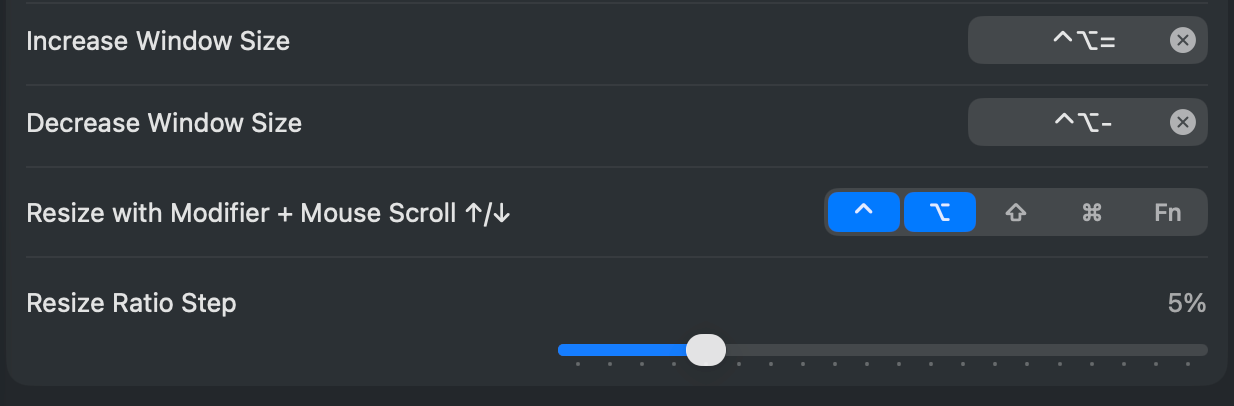
I get what you need, but adjusting the hotkeys just for the active window can achieve a similar result, and honestly it feels more intuitive to me. The default hotkeys are as follows, and I usually prefer using a modifier key plus the mouse wheel scroll to resize the window.

image.png
hhipOP

Let's consider this tiled window layout. Assuming the top right window is active, is there any shortcut to resize it horizontally? The "increase/decrease window size " shortcut only resize vertically.

image.png
WrapperDeveloper

I’d like to know the yabai command for this kind of behavior, I need to look into it.

hhipOP

Well, I looked at my config and now realise that I was actually a combination of commands:

cmd + alt + ctrl + shift - h : yabai -m window --resize left:-100:0; \
                               yabai -m window --resize right:-100:0
cmd + alt + ctrl + shift - j : yabai -m window --resize bottom:0:100; \
                               yabai -m window --resize top:0:100
cmd + alt + ctrl + shift - k : yabai -m window --resize top:0:-100; \
                               yabai -m window --resize bottom:0:-100
cmd + alt + ctrl + shift - l : yabai -m window --resize right:100:0; \
                                  yabai -m window --resize left:100:0
hhipOP

Related: yesterday I ran into a similar but different "friction" with the transition from yabai my particular yabai config.

I had 3 windows vertically tiled (on my vertical-oriented monitor—I often have that setup), and wanted to resize the top window. I got spooked by the fact that resizing the top window (with the existing shortcut) let to the bottom window to be resized as well (propotionally). I definitely see what that would make sense, but it clashed with my previous mental model of "moving split between windows". What I wanted to do is to "move the split between the top and middle windows downward, without any other split moving".

Now, I fully understand that Tangrid cannot explicitly accommodate for every single weird mental model/operation out there. Maybe there is a smaller set of composable settings/operation that could unlock such flexibility at a reasonable UI complexity/maintenance cost?

Open in Discord