It will be nice if we can have some tabgroup-level actions. Also not sure if tabgroup will be a part of workspace, but if so maybe the ability to right click to show list of apps in the workspace and a way to close all in tab group.
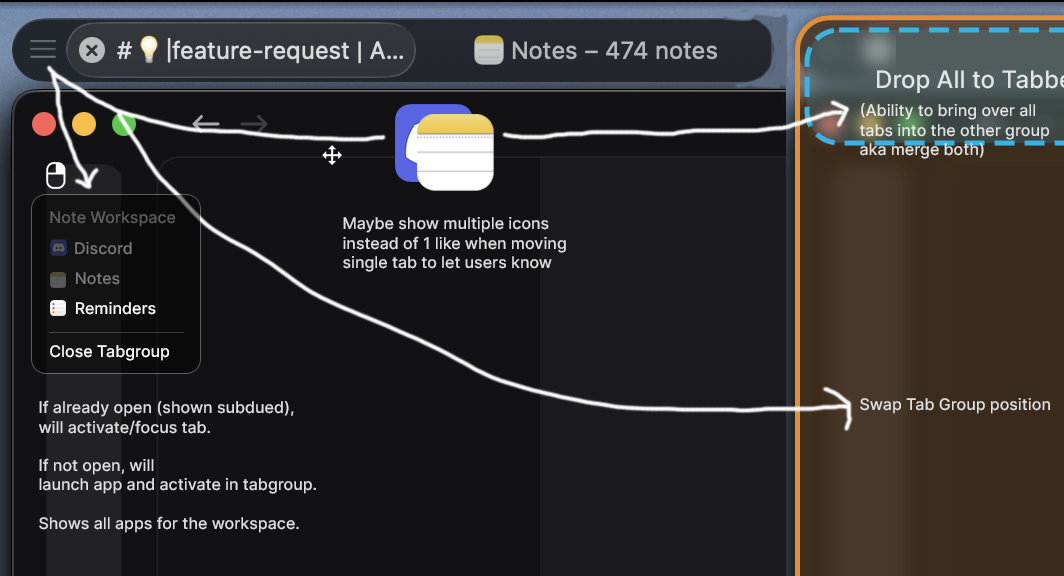
It will be nice if we can have some tabgroup-level actions. Also not sure if tabgroup will be a part of workspace, but if so maybe the ability to right click to show list of apps in the workspace and a way to close all in tab group.

great idea

I'd love it if that button/region allowed for a tab group to be dragged as a whole, though that might end out being messy I duess.
Oh! I forgot to add that into the screenshot, but I think if it behaved like a single tab move (which is what I intended) it would be the same where dragging to near center would show the orange box (which indicates a swap), but anywhere outside of that and the tab group would highlight a blue pane for splitting.
Basically, same as it is now with single tabs, but dragging an icon like that would move all tabs in the tab group as a whole.
Yes - i have a communication group for email, teams, and notes that I move between my primary and secondary (smaller) monitors multiple times a day.
There is another app (I forget the name) that does this and its great… though that app was buggy and hence why Im team Tangrid
I'm working on it. Regarding the right click showing the app list, I feel it's a bit redundant since all the tab items are already visible. What do you guys think?

So for that idea, and maybe it’s based on my misunderstanding — the grayed out items in the menu of my mockup are apps that aren’t currently open but are a part of that tab group (saved thru workspace), but when you click on it, it’ll open there. In your screenshot it seems all apps set in the tabgroup are already open? In that case the menu turns more like an app switcher [activates since already open]. Maybe we can only show apps that aren’t currently opened in that menu?
I’ll be honest though, currently I don’t use Tangrid workspace feature so I will defer to those that do.
v1.6.0 beta added the drag feature, without a dropdown menu.
Thank you! Nice work on the design!