返回社区
讨论中

[Workspace] Target Space changes for all workspaces?

H
hamham4575OP
· 已编辑 2026年7月11日 02:22 UTC

Certain Tangrid workspaces only make sense on certain screens. Is this the intention for "Target Space"?

I wanted "New Workspace 1" to be for my ultrawide only. If I set "New Workspace 1" Target Space option to "#Space 1 - (Sceptre 034)", then all other workspace Target Space value is the same (changed from "#Space 2 - (Built-in Retina Display)")

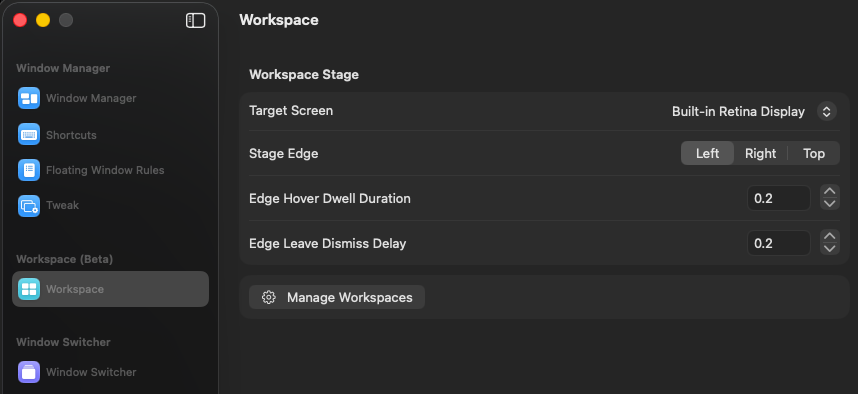
Also, is the intent that the slideout only appears on one monitor and it shows all spaces? Or should each monitor have its own slideout, promoting targeted workspaces first, if not only?

CleanShot_2026-07-10_at_21.16.002x.png

回复4

Wrapper开发者

Workspaces are based on macOS virtual desktops(spaces), and each workspace should be able to target a different space. It’s wired that changing one workspace’s target space also changes the others. Does this happen when you click "Save"?

About slideout settings, you can find it in "Settings".

H
hamham4575OP
· 已编辑 2026年7月11日 02:47 UTC

Oops! Saving worked for me. Not a bug, just a dumb visual confusion by me not saving.

Slideout only works for main screen for me, is it possible to show on the screen with cursor? I looked around but couldn't see a setting for that.

CleanShot_2026-07-10_at_21.37.13.png
Wrapper开发者

the first Target Screen option should be what you want

H
hamham4575OP
· 已编辑 2026年7月11日 02:51 UTC

omg, i should go to an eye doctor.. thx. you can close :)

在 Discord 查看