Back to community
In progress

Tangrid get confused after wakeup from sleep (update 1)

BleisteinOP

It looks like changing the display resolution to "default" on the MBP reduces/cover the problem. This will reduce macOS cycling through different resolutions on wake from sleep. But the problem might be still visible in multi-monitor scenarios.

In general Tangrid might execute some weird screen refreshes, rearranging windows in short time intervals, but at the end the display should look like before the sleep. Specially the order of tabs in tabbed layouts should stay stable.

Maybe implementing a configurable latency time - during which screen resolution/display layout changes would not trigger Tangrid's algorithms - would help. Specially with external monitors the EDID negotiations are taking a monitor/cable defined time...

Replies35

WrapperDeveloper

Could you share the logs?

BrawlerX

Here you go

Tangrid-logs-20260718-132343.zipView only
WrapperDeveloper

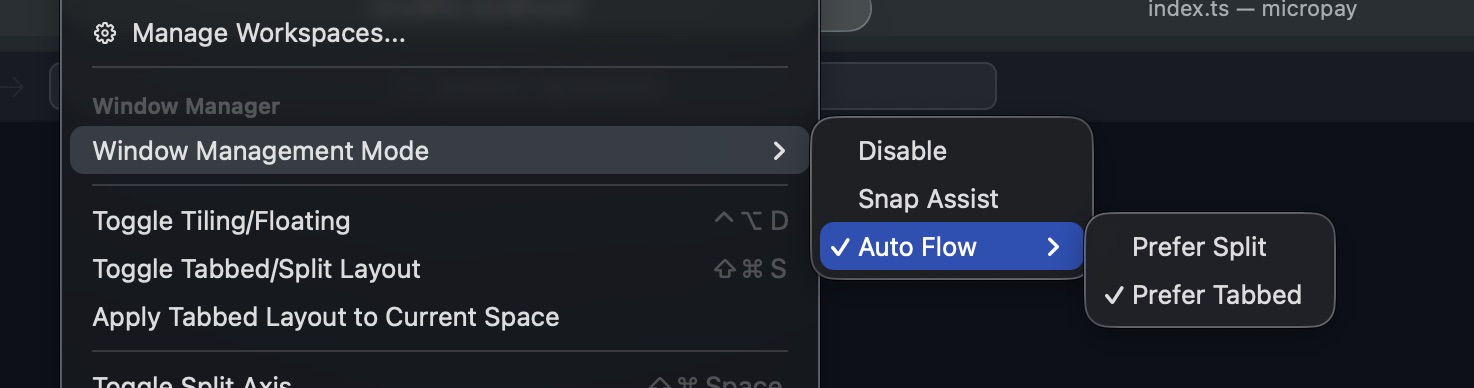
1.4.4 includes an attempted fix, but I’m not sure it fully resolves the issue. Based on the logs, the system rebuilt the built-in “Space,” which also rebuilt the Tangrid layout records. Your default setting is probably “prefer split,” so those windows were split.

Did you change any external monitors or similar devices while it was in sleep mode?

BrawlerX

Ok. Will test it out.

I’ve confirmed that my default settings is ‘prefer tabbed’.

Haven’t changed any display devices while in sleep.

image0.jpg
WrapperDeveloper

Thanks for the info. If there are still issues with 1.4.4, let me know and I'll follow up.