Here is my UI feedback for Workspace 2, some probably existed in v1 but I didn't use that:
It wasn’t clear to me that this Workspace feature required an explicit save. With the rest of the app saving asynchronously I think users would assume it also automatically saves, but I can understand if you hesitate auto saving of complex areas, that said, I think it can be clearer with some or all of the changes below:
- Make save button appear more visually reactive to changes (a) consider hiding instead of disabling buttons, Apple’s glass UI doesn’t make it very clear it’s disabled [icon color change gets swallowed] (b) don’t colorize save button until change is made (c) the save icon looks like config/file export to me, would below SF icon be better; I usually see it for saving.
- Consider adding an “You have unsaved changes?” kind of Save/Discard dialog when closing out of Workspace window if user doesn’t save.
[See Image 1]
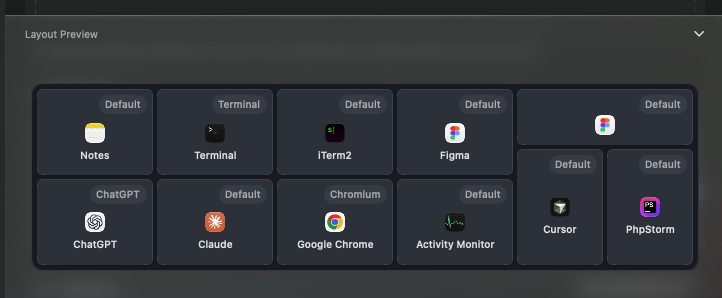
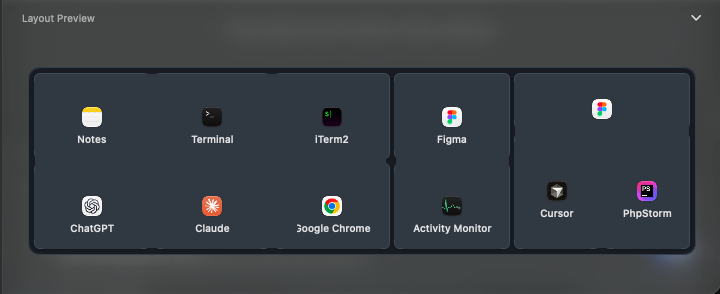
And the Layout Preview - I guess I am maybe using workspaces feature very simply (only one Desktop per monitor, no command templates), so maybe in complex cases it makes more sense to have your layout. But to me, Tab groups is an excellent and popular feature of Tangrid, so I think most users (like me) would expect to see the gray fills containing multiple icons where the gray fills represent the tiles/tab group splits. I think Command Template can be moved to the right pane that slides in after.
[See Image 2]
Let's say I have 3 splits in this silly example:
Left tabgroup [Claude, ChatGPT, Notes, Terminal, iTerm2, Chrome]
Middle tabgroup [Figma, Activity Monitor]
Right tabgroup [Figma window 2, Cursor, PHPStorm]
Icons can also live closer to each other like in workspace preview, this is just a rough mockup, but to me this is what I would expect to see for layout preview:
[See Image 3]